How To Setup Wireguard
Background
I’ve service 9router that i want to install on my VPS so i can access it anywhere, but i don’t want to make it public, since on that service contain my AI API KEY on 9router. So i decide to install wireguard on my VPS
Server Side
Install Wireguard on server, in my case using Ubuntu 24.04:
apt install wireguard wireguard-tools qrencodeSince by default my VPS already activate feature IP forwarding, check on
/proc/sys/net/ipv4/ip_forward, if the value is1, then server ready to IP forwarding. if not, then run this commandecho 'net.ipv4.ip_forward=1' | sudo tee /etc/sysctl.d/wg0.conf && sudo sysctl -p /etc/sysctl.d/99-wireguard.confto enable ip forwarding
Generate server key on the server
mkdir -p wg
cd wg
wg genkey | tee server_private.key | wg pubkey > server_public.key
chmod 600 server_private.key
chmod 600 server_public.key
Command above will generate private and public key of wireguard on the VPS that will be use later and set the permission of the files to make it only read by user who create it
After generate key for the server, generate the key for the client
cd wg
mkdir client1
cd client1
wg genkey | tee client_private.key | wg pubkey > client_public.key
chmod 600 client_private.key
chmod 600 client_public.key
Now, configure the wireguard on the server
sudo vim /etc/wireguard/wg0.confand fill the file with this
[Interface]
Address = 10.0.0.1/24
ListenPort = 51820
PrivateKey = <server_private.key>
PostUp = iptables -I FORWARD 1 -i %i -j ACCEPT; iptables -I FORWARD 1 -o %i -j ACCEPT; iptables -t nat -A POSTROUTING -o enp0s6 -j MASQUERADE
PostDown = iptables -D FORWARD -i %i -j ACCEPT; iptables -D FORWARD -o %i -j ACCEPT; iptables -t nat -D POSTROUTING -o enp0s6 -j MASQUERADE

#Client 1
[Peer]
PublicKey = <client_public.key>
AllowedIPs = 10.0.0.2/32
Don’t forget to set the permission of the file
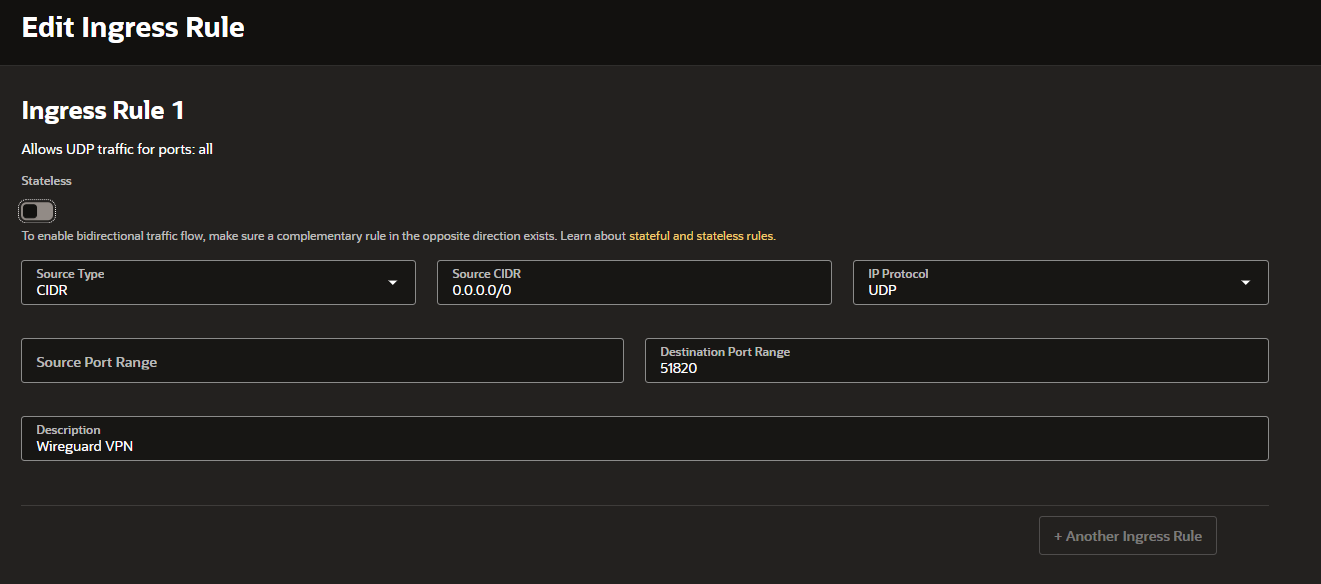
sudo chmod 600 /etc/wireguard/wg0.confNow is to open firewall on the VPS, since i’m using oracle for the VPS. Here’s my configure to open firewall on oracle in Virtual Cloud Networks menu.
Client Side
Install Wireguard on client, in my case using Linux:
apt install wireguard wireguard-toolsCreate config file in the client
sudo vim /etc/wireguard/wg0.confand fill with this
[Interface]
PrivateKey = <client_private.key>
Address = 10.0.0.3/24
DNS = 1.1.1.1, 8.8.8.8

[Peer]
PublicKey = <server_public.key>
Endpoint = <IP_SERVER>:51820
AllowedIPs = 10.0.0.0/24
Copy value of client_private.key and server_public.key from the VPS. And if want to all connection through the VPS, change the value on AllowedIPs with
0.0.0.0/0
change the permission, and start the VPN
sudo chmod 600 /etc/wireguard/wg0.conf
sudo wg-quick up wg0
sudo systemctl enable wg-quick@wg0
Congrats, now you have VPN :)